Admin Guide
MCP Catalog
The MCP catalog is the admin-managed list of available MCPs on your Ambassador Server. Admins add MCPs, configure them, validate connectivity, and publish them to the marketplace for users.
Catalog lifecycle
Add (from registry or manually)
       │
       ▼
  Configure (credentials, spawn command)
       │
       ▼
  Validate (connectivity check, tool list fetch)
       │
       ▼
  Publish (visible to users in marketplace)
       │
       ▼
  Assign to Groups
       │
       ▼
  Archive (remove from marketplace, keep audit history)
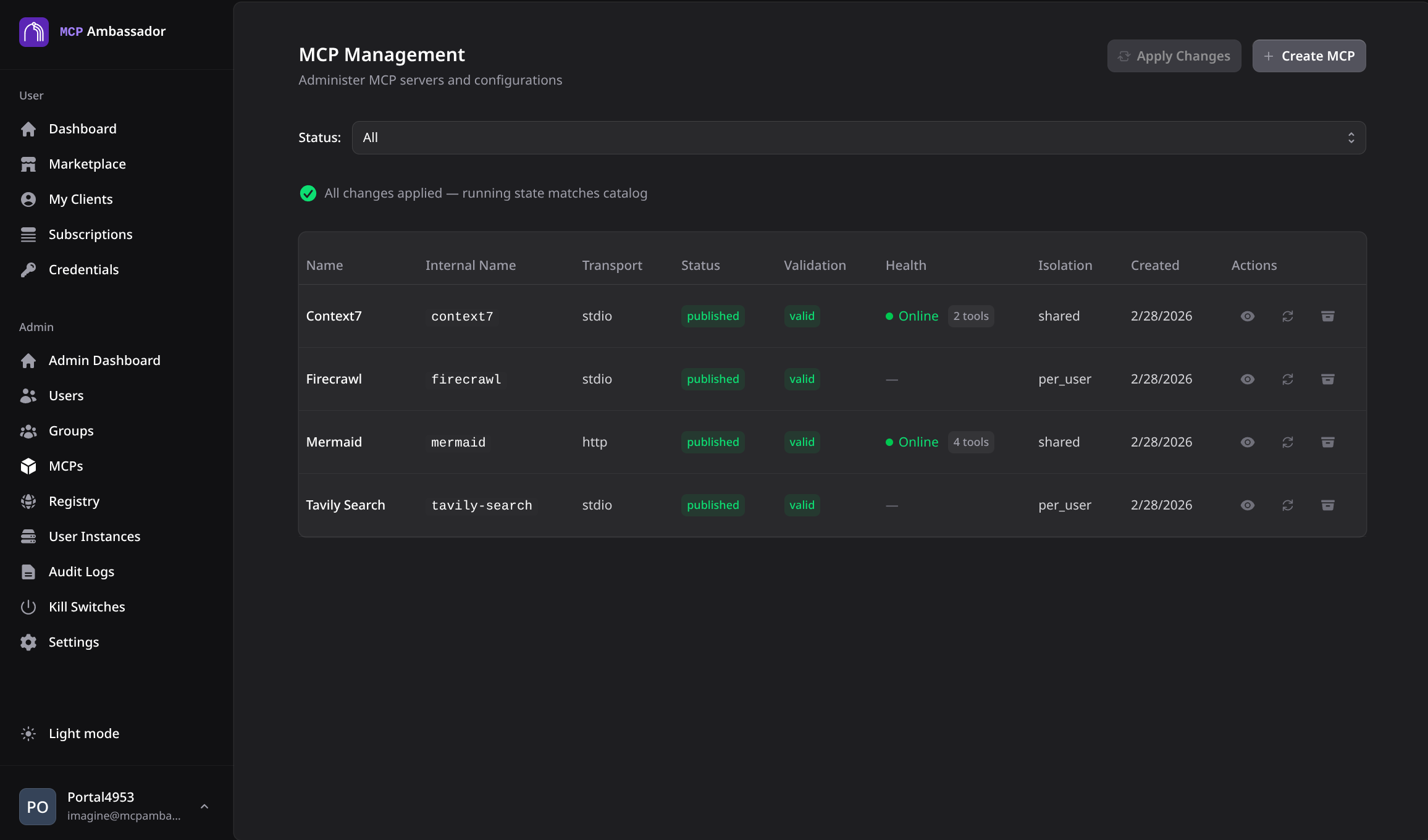
Adding from the community registry
The fastest way to add an MCP — spawn commands and env var schemas are pre-filled:
- Navigate to MCP Catalog → Add from Registry
- Browse or search the registry (38+ pre-configured MCPs)
- Click Add to Catalog — fields are pre-populated
- Fill in any server-level credentials (e.g., a service account API key)
- Optionally adjust the spawn command or timeout
- Click Validate to test connectivity
- Click Publish and assign to groups
See the Community Registry for the full list of available MCPs.
Adding manually
For MCPs not in the registry:
- Navigate to MCP Catalog → Add MCP
- Fill in the fields:
| Field | Description |
|---|---|
Name | Short identifier (lowercase, hyphens, e.g., my-mcp) |
Display name | Human-readable name |
Description | What this MCP does (1-2 sentences) |
Transport | stdio or http |
Command | Spawn command (e.g., npx -y @modelcontextprotocol/server-github) |
Arguments | Optional args array |
Environment variables | Define what env vars this MCP needs (name, description, required) |
Isolation | per_server (shared process) or per_user (one process per user) |
Tags | Category tags (e.g., code, database) |
- Click Validate to test the spawn command and fetch the tool list
- Click Publish when ready
Via Admin API
# List catalog
curl -k -b cookies.txt https://localhost:9443/v1/admin/mcps

# Add MCP
curl -k -b cookies.txt \
  -X POST https://localhost:9443/v1/admin/mcps \
  -H "Content-Type: application/json" \
  -d '{
    "name": "github",
    "display_name": "GitHub",
    "description": "GitHub API — search code, manage PRs, issues",
    "transport": "stdio",
    "command": "npx",
    "args": ["-y", "@modelcontextprotocol/server-github"],
    "env_schema": [
      {
        "name": "GITHUB_PERSONAL_ACCESS_TOKEN",
        "description": "GitHub Personal Access Token with repo scope",
        "required": true,
        "secret": true
      }
    ],
    "isolation": "per_user",
    "tags": ["code", "version-control"]
  }'

# Validate connectivity
curl -k -b cookies.txt \
  -X POST https://localhost:9443/v1/admin/mcps/:id/validate

# Publish
curl -k -b cookies.txt \
  -X POST https://localhost:9443/v1/admin/mcps/:id/publish
Credential scope: server vs user
MCPs can have two types of credentials:
- Server-level credentials — shared across all users (e.g., a service account token). Set by the admin in the catalog; never exposed to users.
- User-level credentials — per-user API keys provided by users in the marketplace. The env schema defines which vars are user-provided.
Example: A postgres MCP might use a server-level DATABASE_URL (shared read-only connection), while a github MCP uses per-user GITHUB_PERSONAL_ACCESS_TOKEN (each user provides their own token).
Isolation modes
| Mode | Description | Use when |
|---|---|---|
per_server | One MCP process shared across all users | Shared service accounts; stateless MCPs |
per_user | Separate MCP process per user | User-provided credentials; stateful MCPs |
Most credential-based MCPs should use per_user isolation.
Archiving an MCP
Archiving removes an MCP from the marketplace without deleting audit history:
curl -k -b cookies.txt \
  -X POST https://localhost:9443/v1/admin/mcps/:id/archive
Existing subscribers lose access immediately. To restore, publish the MCP again.
Kill switches
See Kill Switches for disabling individual tools or entire MCPs without archiving.